
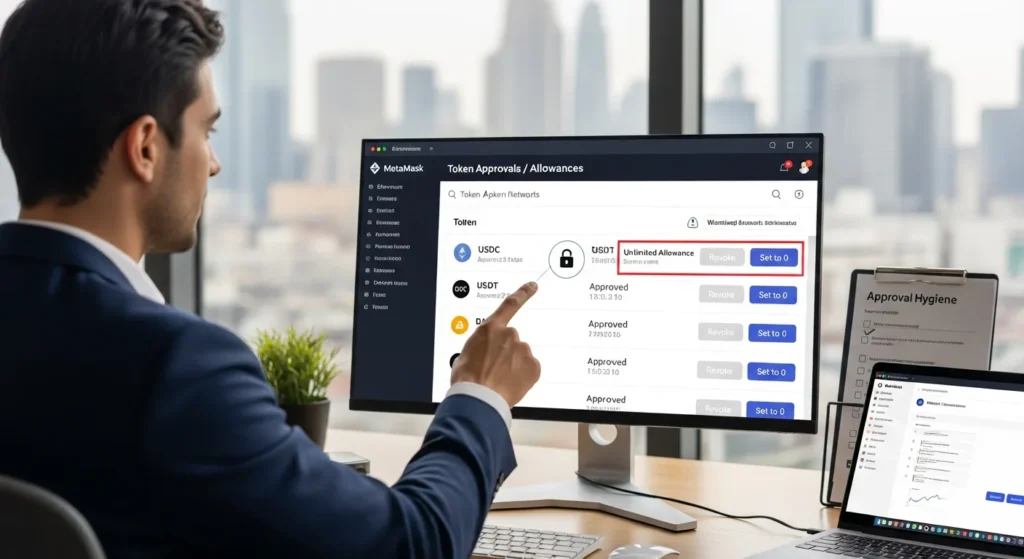
You know that tiny “Approve” click you do before a swap or an NFT mint, the one you barely read because you’re trying to catch a price move? Yeah… that’s often the most dangerous transaction you sign.
When you approve a token, you’re giving a smart contract permission to move that token out of your wallet later. Sometimes it’s for a specific amount. But a lot of the time it’s effectively “take as much as you want, whenever you want” (aka an unlimited allowance). That’s how people get drained even when they didn’t sign a new transaction.
In this guide, you’ll learn how to revoke token approvals in MetaMask, when to do it, how to do it safely (including third-party tools), and what to check if a revoke doesn’t seem to “stick.” Think of it like cleaning up old app permissions on your phone, except the stakes are your money.
What Token Approvals Are And Why They Can Be Risky
Token approvals are a normal part of using ERC-20 tokens on Ethereum and other EVM networks. They’re also one of the easiest ways for attackers to empty a wallet that otherwise looks “secure.”
Allowance Basics: What You’re Actually Granting
When you “approve” a token, you’re using an ERC-20 function commonly called approve() to set an allowance.
In plain English:
- You = token holder
- Spender = smart contract (like a DEX router, bridge contract, or marketplace)
- Allowance = how much that spender is allowed to transfer from your wallet
Approvals don’t move tokens immediately. They set the rules for later. Then the spender can call transferFrom() to pull tokens from your wallet up to the allowance.
Here’s the catch: many dApps request unlimited allowances (often a maximum number like uint256 max). It’s convenient, no need to approve every time, but if that spender ever turns malicious (or gets exploited), it can become a standing permission slip to drain you.
If you want the canonical, unglamorous details, the ERC-20 standard behavior is widely documented and reflected across explorers like Etherscan and common security write-ups.
Common Scenarios That Create Approvals (DEXs, Bridges, NFT Marketplaces)
You’ll usually create approvals during totally normal crypto activities, including:
- DEX swaps (example: swapping USDC → ETH on Uniswap-style routers)
- Liquidity actions (adding/removing liquidity, staking LP tokens)
- Bridges (moving assets between Ethereum and L2s or other chains)
- Airdrop claims (some claim contracts ask for approvals, red flag depending on context)
- NFT marketplaces (listings sometimes require approval for WETH, or approval for NFT contracts to transfer your NFTs)
This is why approvals pile up over time. If you’ve been active for a year, especially across multiple networks, you probably have dozens.
How Approvals Get Abused: Drainers, Compromised DApps, And Unlimited Allowances
Approvals are a favorite tool of wallet drainers because they don’t always need you to sign a new “obvious” transfer.
Common abuse patterns:
- Unlimited allowance + malicious spender: You approved a shady token tool once. Months later, it uses that unlimited allowance to pull your USDT.
- Compromised dApp: A legit site gets hacked (front-end injected). You approve what you think is the normal contract, but it’s a malicious spender.
- Approval phishing: Fake “revoke” pages or “claim” pages trick you into approving a spender you don’t recognize.
On-chain analytics and incident reports often show the same theme: approvals sit quietly until they’re exploited. Research firms and security teams (including those publishing industry reports like Chainalysis on crypto crime trends) have repeatedly highlighted social engineering and smart-contract interaction risks as major loss drivers.
The simple takeaway: old approvals are risk you’re carrying for free. And you don’t get a loyalty discount for it.
When You Should Revoke Approvals (A Practical Checklist)
You don’t need to revoke everything daily like you’re polishing a doorknob. But you do want a simple routine, especially if you’re actively trading, bridging, minting, or chasing new dApps.
After One-Time Trades, Airdrops, And New DApps
If the interaction was basically a one-off, revoke it.
Good “revoke right after” moments:
- You swapped a token you don’t plan to touch again
- You used a new bridge once for a transfer
- You claimed a random airdrop (especially smaller / unknown projects)
- You minted on a new platform you found on Twitter (no judgment, just… revoke)
A practical rule: If you wouldn’t trust that app to hold your cash overnight, don’t leave it with open permissions.
When You See Unlimited Spend Or Unknown Spenders
Unlimited approvals aren’t automatically evil, but they should be intentional.
Revoke immediately if:
- The spender name/address is unfamiliar
- The approval is for a token you care about (ETH wrappers, stablecoins, blue-chip tokens)
- The allowance is unlimited and you don’t actively use that dApp anymore
If you’re not sure what an address is, look it up on a block explorer (like Etherscan for Ethereum) and see if it’s a known contract with labels and activity.
After Wallet Hygiene Events: Device Changes, Phishing Scares, Or Seed Exposure
This is the “better safe than sorry” category. If any of these happened, do an approval sweep:
- You clicked something sketchy and signed anything
- You installed a new browser extension and later regretted it
- Your computer was compromised / you got malware warnings
- You imported your seed phrase into something you shouldn’t have
- You’re moving from one device to another and want a clean slate
Important nuance: revoking approvals doesn’t fix a fully compromised seed phrase. If your seed is exposed, the right move is usually moving funds to a fresh wallet (new seed) and treating the old one as burned. Revoking approvals is still useful, but it’s not a magical reset button.
How To Revoke Approvals Using MetaMask Portfolio
MetaMask has made this easier in recent years through MetaMask Portfolio, which can surface token approvals and let you revoke them.
Step-By-Step: Find Approvals And Disconnect Spenders
Here’s the clean, practical flow:
- Open MetaMask Portfolio (from MetaMask’s official interface, not a random Google ad).
- Connect the wallet/account you want to check.
- Navigate to the area that shows token approvals / allowances.
- Review the list by token and spender.
- For anything you don’t recognize (or no longer use), click Revoke.
- MetaMask will prompt you to confirm a transaction.
- Confirm, pay the gas fee, and wait for on-chain confirmation.
What you’re doing on-chain is typically setting the allowance to 0 for that spender.
If you want to sanity-check that it worked, you can verify via a block explorer after the transaction confirms.
Network And Account Gotchas (Ethereum vs. L2s, Multiple Addresses)
This is where most people get tripped up.
- Approvals are per network. Revoking on Ethereum doesn’t revoke on Arbitrum, Optimism, Polygon, Base, BNB Chain, etc.
- Approvals are per address. If you have multiple accounts in MetaMask, each has its own allowances.
- Some networks won’t show up the same way. MetaMask Portfolio supports major networks, but you may need a third-party tool for broader coverage.
A quick workflow that saves headaches:
- Check your main wallet on Ethereum
- Then check your active L2(s) where you actually trade
- Then check any “side wallets” you used for mints/airdrops
Understanding Gas Fees And What Happens On-Chain
Revoking an approval is not “free” because it’s an on-chain state change.
What to expect:
- You’ll pay gas in the network’s native token (ETH on Ethereum/Base/Arbitrum/Optimism, MATIC on Polygon, etc.).
- If the network is congested, revoking can be annoyingly expensive, this is why people batch this during low-fee windows.
- Once confirmed, the spender can no longer pull tokens beyond the new allowance (typically zero).
One subtle point: revoking doesn’t undo past damage. It prevents future use of that permission.
How To Revoke Approvals With Third-Party Approval Checkers (Safely)
Sometimes MetaMask Portfolio won’t cover a network you used, or you want a more powerful view (sorting by newest approvals, scanning tons of chains, etc.). That’s where third-party approval checkers come in.
What These Tools Do Differently Than MetaMask
Third-party tools often:
- Scan more networks and sidechains
- Provide better filtering (by token value, unlimited allowances, last activity)
- Link directly to explorer data for transparency
Commonly used options include:
- revoke.cash (popular for multi-network scans)
- Explorer-based tools like Etherscan Token Approvals
They don’t “take custody” of your wallet. They usually just read allowance data, then prompt a standard revoke transaction you sign in MetaMask.
How To Verify You’re On The Right Site And Avoid Fake Revoke Pages
This part matters more than the revoke itself.
Attackers love making fake “revoke approvals” sites because the audience is already in security mode (and more likely to trust the page).
Use this safety checklist:
- Type the URL manually or use a trusted bookmark
- Don’t click sponsored search ads for revoke tools
- Check the domain carefully (look for subtle misspellings)
- Make sure your wallet prompt matches what you intend: a revoke should look like setting allowance to 0, not a token transfer
- If you’re unsure, cross-check with an explorer tool like Etherscan
If you want one habit that pays off: treat revoking like logging into your bank, no links from DMs, no rushed clicks.
Revoking Across Multiple Networks Efficiently
If you’re active across chains, revoking can feel like whack-a-mole.
A simple, efficient approach:
- Start with the networks where you hold the most value (Ethereum + your main L2)
- Revoke unlimited allowances first (highest risk)
- Revoke old approvals for stablecoins (USDC/USDT/DAI) and major tokens
- Then clean up smaller approvals when fees are low
Quick reference table: where to check approvals
| Network | Good starting place | Notes |
|---|---|---|
| Ethereum | MetaMask Portfolio / Etherscan approval checker | Higher gas, prioritize high-value tokens |
| L2s (Arbitrum/Optimism/Base) | MetaMask Portfolio / revoke.cash | Typically cheaper to revoke |
| Polygon / BNB Chain | MetaMask Portfolio / revoke.cash | Lots of dApps = lots of approvals over time |
Troubleshooting: If A Revoke Doesn’t Seem To Work
You revoked, paid gas, and… the approval still shows? Or the spender comes back like a bad sequel? Here’s what’s usually going on.
Pending Or Failed Transactions And How To Resolve Them
First check whether the revoke transaction actually confirmed.
- If it’s pending, you may need to “Speed up” (replace) the transaction in MetaMask with a higher gas fee.
- If it failed, open the transaction on a block explorer to see the error (often underpriced gas, nonce issues, or temporary network problems).
If you have multiple pending transactions stuck, you may need to clear the queue by replacing the earliest stuck one.
Token Or Spender Not Showing Up In Your List
This is usually one of these:
- You’re on the wrong network (you approved on Arbitrum but you’re checking Ethereum)
- You’re viewing the wrong account/address in MetaMask
- The tool you’re using doesn’t support that network or token standard
Fix: switch networks, double-check the wallet address, then try an explorer-based checker for that specific chain.
Approvals Reappearing After Reconnecting To A DApp
This one’s sneaky but normal.
Revoking is on-chain and permanent until you approve again. But when you reconnect to a dApp and try to trade, it may request a fresh approval, often unlimited by default.
What to do:
- When prompted, look for an “Edit permission” or “Use custom spending cap” option
- Approve only what you need (especially for one-time actions)
- If the dApp only offers unlimited approvals, ask yourself if it’s actually worth using
Best Practices To Minimize Approval Risk Going Forward
Revoking is great. Not needing to revoke constantly is even better.
Prefer Exact Amounts Over Unlimited (And When Unlimited Is Reasonable)
Whenever MetaMask (or the dApp) lets you choose, approve an exact amount.
Use exact amounts when:
- You’re doing a one-time swap
- You’re interacting with a new dApp
- You’re using a token you hold long-term (especially stablecoins)
Unlimited can be reasonable when:
- It’s a battle-tested dApp you use constantly
- The spender is a well-known router contract and you understand the risk
- You’re okay trading a bit of security for convenience (at least you’re choosing consciously)
A practical compromise: approve a “working amount” (like 2–4 weeks of typical usage), not infinite.
Use Separate Wallets For DeFi, NFTs, And Long-Term Storage
This is one of the highest-ROI habits in crypto security.
Try a 3-wallet setup:
- Cold/long-term wallet (ideally hardware wallet): holds your core assets, minimal dApp interactions
- DeFi wallet: swaps, farming, bridging, higher risk, lower balance
- NFT/experimental wallet: mints, new marketplaces, airdrops, treat it like a sandbox
If your “NFT wallet” gets wrecked, your long-term stack doesn’t have to go down with it.
Add Guardrails: Hardware Wallets, Simulation, And Transaction Review Habits
A few guardrails can prevent the classic “I clicked approve at 2 a.m.” disaster:
- Hardware wallet: adds friction (good friction). You physically confirm transactions.
- Transaction simulation: some tools and wallets show what a transaction will do before you sign (helpful against hidden drainers).
- Slow down on approvals: read the spender, edit allowance if possible, and don’t sign if the request feels off.
If you want a simple routine: do a monthly approvals check on your main networks, like a quick security “budget review.” It takes 10 minutes and can save you months of regret.
Conclusion
If you use DeFi, bridges, or NFT apps, token approvals are unavoidable. But leaving old approvals lying around, especially unlimited ones, is like leaving spare keys under the doormat all over town.
Your simple game plan:
- Revoke approvals after one-time actions and airdrops
- Prioritize unlimited allowances and unknown spenders
- Use MetaMask Portfolio for quick cleanup, and reputable third-party checkers for broader network coverage
- Reduce future risk with separate wallets and tighter approval amounts
One question to leave you with: if you opened your approvals list right now, would you recognize every spender that can move your tokens?
Disclaimer: This content is for informational purposes only and does not constitute financial or investment advice.